 URLPluck
Extract webpage links in one click
Find the visible webpage’s hyperlinks and copy multiple links at once instead of opening them individually.
URLPluck is a free Chrome link extractor. Copy hyperlinks from the page you’re viewing, filter duplicate URLs, save organized collections, and export links to CSV, JSON, TXT and more. No coding or account required.
Free to use · No sign-up · Chrome Web Store
Need to extract URLs from a website page without copying them one by one? Gather the links on your current page, narrow the list, and keep or export what matters.
Find the visible webpage’s hyperlinks and copy multiple links at once instead of opening them individually.
Filter by domain or link type, review internal and external URLs, remove duplicates, and optionally clean tracking parameters when saving.
Save links to named collections, then search, organize, and revisit them.
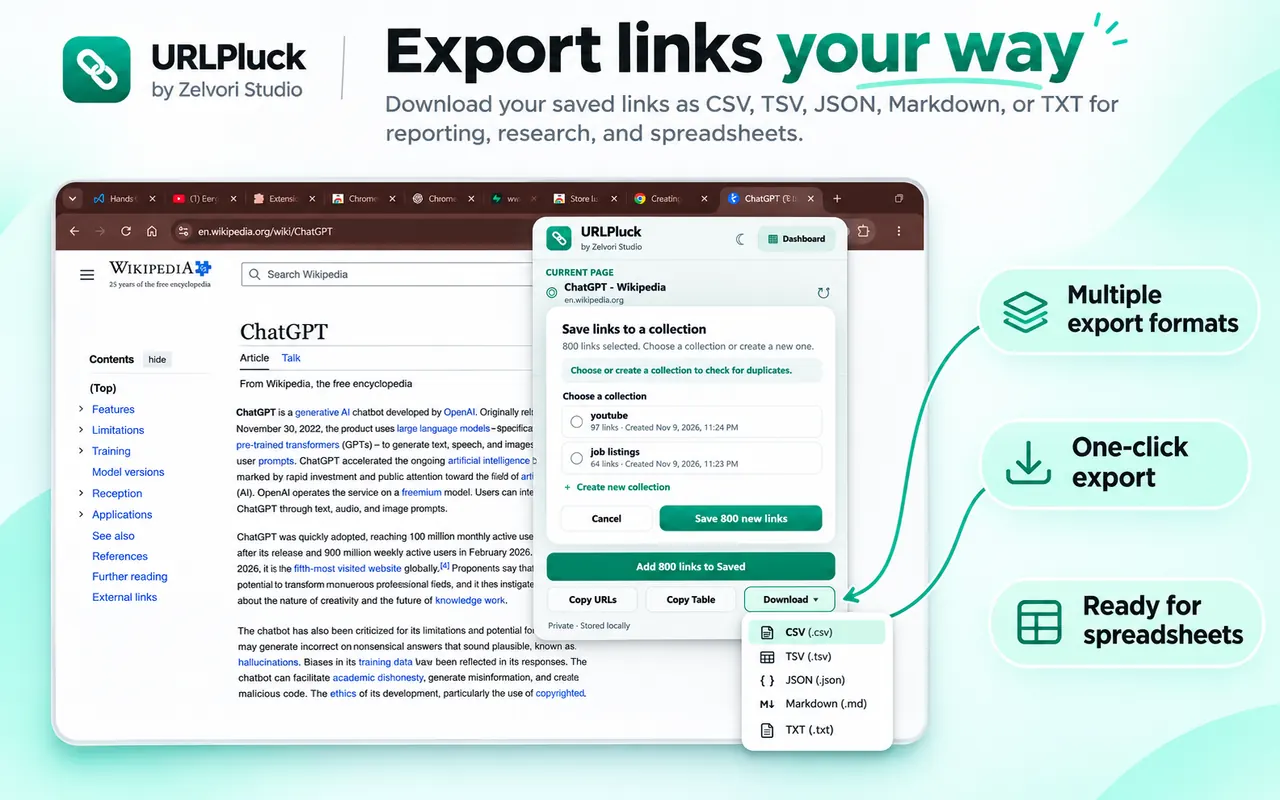
Download a spreadsheet-friendly CSV or TSV, structured JSON, Markdown, or plain TXT file.
No account required. Saved collections remain in your browser’s local extension storage.
Back up your collections to a file and restore them later.
No scraping scripts or technical setup. Use this Chrome URL extractor on a page you already have open.
Visit the page in Chrome, then click the URLPluck toolbar icon to collect the links available there.
Review the extracted hyperlinks. Filter by domain or link type and save useful URLs in a named collection.
Copy URLs to your clipboard or download a CSV, TSV, JSON, Markdown or TXT file for later use.
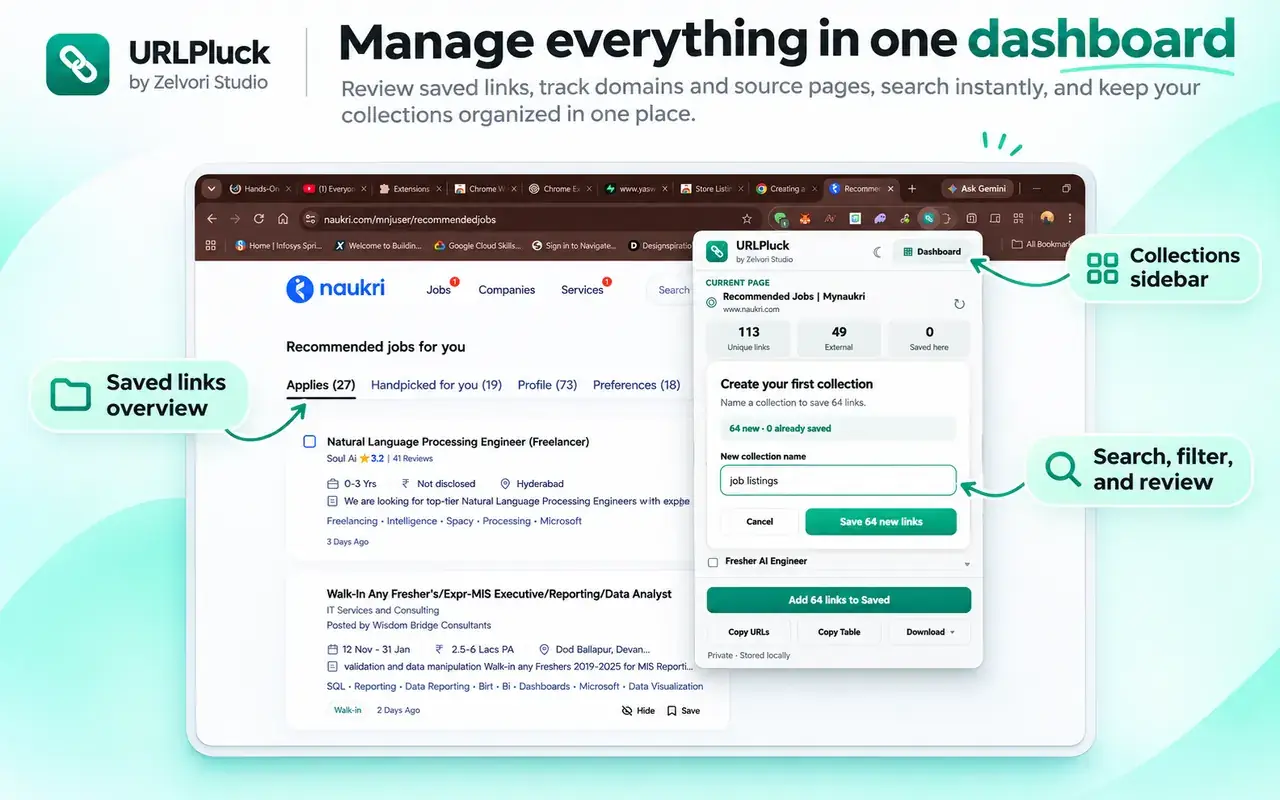
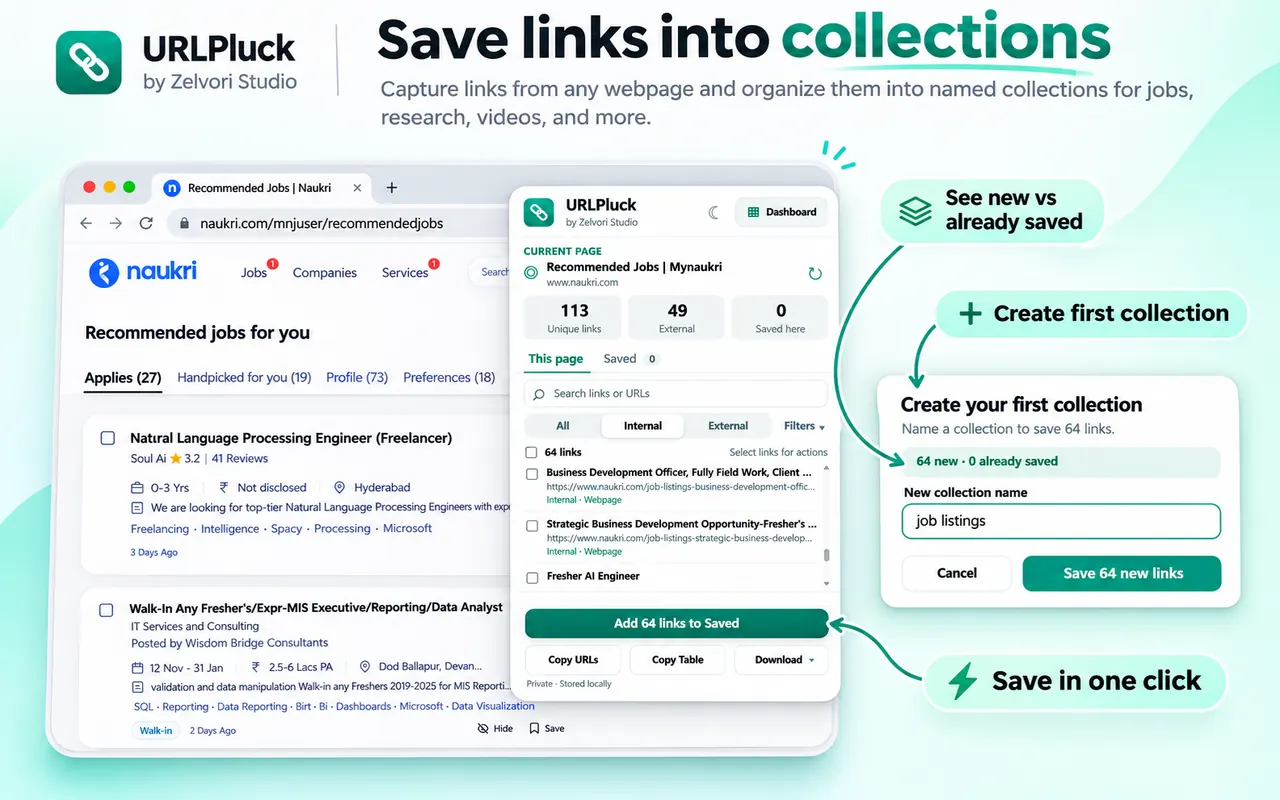
Most basic URL grabbers stop after copying links. URLPluck lets you save selected links from different pages into local collections, then search and revisit them in one place.
Gather helpful hyperlinks from the open webpage, whether you are collecting references, organizing job leads, or preparing a URL list for analysis.
Gather useful reference links from resource pages and keep them grouped by topic.
Collect links from job pages, industry resources, and competitor research. Keep useful URLs organized without juggling scattered tabs.
Export webpage links to CSV for Excel or Google Sheets, or use JSON and text formats for other workflows.
Want to work with extracted URLs in a spreadsheet? Download a CSV or TSV file and open it in Excel or Google Sheets. You can also export structured link data to JSON or keep a simple list in Markdown or TXT.
URLPluck exports CSV files, not native .xlsx workbooks. It extracts hyperlinks from the webpage you open; it does not crawl every page of an entire domain.
Practical walkthroughs for Chrome users. Each guide uses the actual URLPluck workflow, with screenshots and answers to common questions.
Find hyperlinks on an open Chrome tab, filter the results and keep the URLs you need.
Read extraction guide Guide 02 · ExportDownload link lists as CSV or TSV and open them in Excel or Google Sheets.
Read CSV export guide Guide 03 · CopyCopy many URLs at once, remove duplicates and organize useful links in collections.
Read bulk-copy guideHow to extract links, copy webpage URLs, export lists, and keep collections organized in Chrome.
Built by Zelvori Studio · For the current URLPluck extension
A link extractor collects hyperlink URLs from a webpage so you don't have to copy them one by one. URLPluck adds filtering, local link collections, and downloadable exports to that basic workflow.
Open the webpage in Chrome, click the URLPluck extension, and review the hyperlinks available on that page. You can filter them, copy the list, save selected links, or export the results.
Run URLPluck on the page and use its copy option to copy the extracted list. You can also export a file if you want to preserve the links in a reusable format.
Install URLPluck, visit the webpage you want to inspect, and activate the extension. No Python, JavaScript, or web scraping setup is needed for collecting links from the open page.
No. URLPluck is a link extractor for the webpage currently open in Chrome, not a whole-site crawler or sitemap generator. To gather links from several pages, visit them individually and save the useful results.
Yes. Export links as CSV or TSV, then open or import that file in Microsoft Excel or Google Sheets. URLPluck does not create a native .xlsx file.
URLPluck can export CSV, TSV, JSON, Markdown, and plain TXT. Choose CSV for spreadsheets, JSON for structured data, or text-based formats for simple link lists.
Yes. URLPluck distinguishes internal and external hyperlinks on the open webpage so you can review and filter the results. You can also filter by domain or link type.
Use URLPluck's duplicate filtering to clean repeated links before copying, saving, or exporting. Some tracking-parameter cleanup options may also be available when saving links.
URLPluck reads available hyperlink text or labels along with URLs on supported webpages. This helps you review which links are relevant before you save or export them.
Yes. After extracting hyperlinks from the open page, narrow the list using domain and link-type filters. This makes it easier to separate useful links from navigation or unrelated URLs.
Yes, if those hyperlinks are available on the supported webpage you have open. URLPluck can help organize links from resource pages, job boards, repositories, and research sites. Results depend on what the page actually loads.
Yes. Extract links from one page, save the ones you want to a named collection, then visit other pages and add more. Collections stay available in the extension's local dashboard.
Yes. URLPluck's current Chrome extension is free to install and use from the Chrome Web Store.
No. URLPluck's current version does not require an account to extract, copy, export, or save links locally.
Saved collections are stored in your browser's local extension storage rather than a Zelvori Studio cloud account. You control when links are extracted and saved.
The current website documents local backup and restore options for collections. Keep any exported backup file somewhere safe so you can import it later if needed.
Some websites load more links after scrolling, clicking, or signing in. URLPluck works with hyperlinks available on the supported page when you run it and cannot guarantee access to hidden, restricted, or unloaded links.
No. It's a webpage link grabber and URL exporter, not a bulk file downloader. You can collect links pointing to files, but URLPluck does not automatically download all the files behind them.
Email zelvori.studio@gmail.com. Tell us what page or export you were using and what happened, so we can investigate.
URLPluck is free on the Chrome Web Store. Start collecting useful links today.
Get URLPluck for free